 standalone
 Gemini 3.1 Flash Lite Image: Google's Fastest Cheap Image Model
Google's gemini-3.1-flash-lite-image (aka Nano Banana 2 Lite) is now available via API — here's what developers should know about the fastest Gemini image model.
TL;DR
Google quietly released gemini-3.1-flash-lite-image, internally nicknamed “Nano Banana 2 Lite” — their fastest and cheapest image generation model, available now through the Gemini API.
What happened
Google DeepMind has added a new model to the Gemini image lineup: gemini-3.1-flash-lite-image, which they describe as optimized for speed and cost over raw quality. It sits at the budget end of the Gemini image family, positioned for high-volume or latency-sensitive use cases. The model is accessible through AI Studio and the Gemini API today.
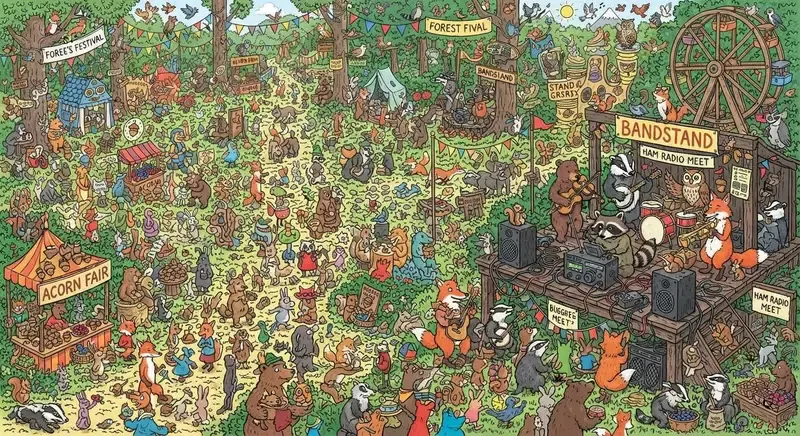
Simon Willison tested it with a “Where’s Waldo but with a raccoon holding a ham radio” prompt and came away impressed with the composition — though the model misspelled “Forest Festival” twice, in two different ways, which is exactly the kind of text-rendering fumble that still trips up image models regularly.
Code example
# pip install google-genai
from google import genai
from google.genai import types

client = genai.Client(api_key="YOUR_API_KEY")

response = client.models.generate_content(
    model="gemini-3.1-flash-lite-image",
    contents="A where's Waldo style scene but find the raccoon holding a ham radio",
    config=types.GenerateContentConfig(response_modalities=["image", "text"])
)

# Image data in response.candidates[0].content.parts
# Check https://ai.google.dev/gemini-api/docs/image-generation for exact parsing
Why it matters
The Gemini image model tier is getting genuinely interesting for developers who need programmatic image generation at scale. Flash Lite sits below Flash (and well below Pro) in the quality hierarchy, but “fastest and cheapest” is exactly what you want when you’re generating thumbnails, previews, or prototyping pipelines where burning money on a premium model makes no sense. The comparison to earlier Nano Banana models suggests real quality improvements have landed even at the lite tier — better scene composition on a complex prompt is not nothing.
The text rendering issue is worth flagging because it’s a real limitation if your use case involves generating images with legible labels, signs, or UI mockups. This isn’t unique to Google — most image models still struggle with arbitrary text — but it’s something to test explicitly before committing to this model in production.
What to watch
- Whether pricing details surface that let you do a direct cost-per-image comparison against Flux, SDXL-based APIs, or Imagen 3
- How text rendering holds up on simpler prompts — the festival scene is a hard test; signage on a product mockup might be a more practical benchmark